An open-source project
Apache-2.0
The open-source alternative to Claude Science,for research automation.
Read papers, run analysis code, and inspect scientific artifacts in one local workspace. Built on Claude Code and Codex, with source you can explore and skills you can extend.
Open source · Local workspace · Your choice of agent
01 / A research workflow
From a question to work you can inspect.
- 01
Start with a question
Bring your dataset, notebook, or research context into the conversation.
- 02
Work through the analysis
Follow the code and tool activity as the agent works through each step.
- 03
Inspect. Revise. Continue.
Review the outputs, question the method, and carry the files into your next experiment.
§ 2 / Runcell Science
Keep the research together.
Papers, experiments, code, and the files they produce belong in the same working context.
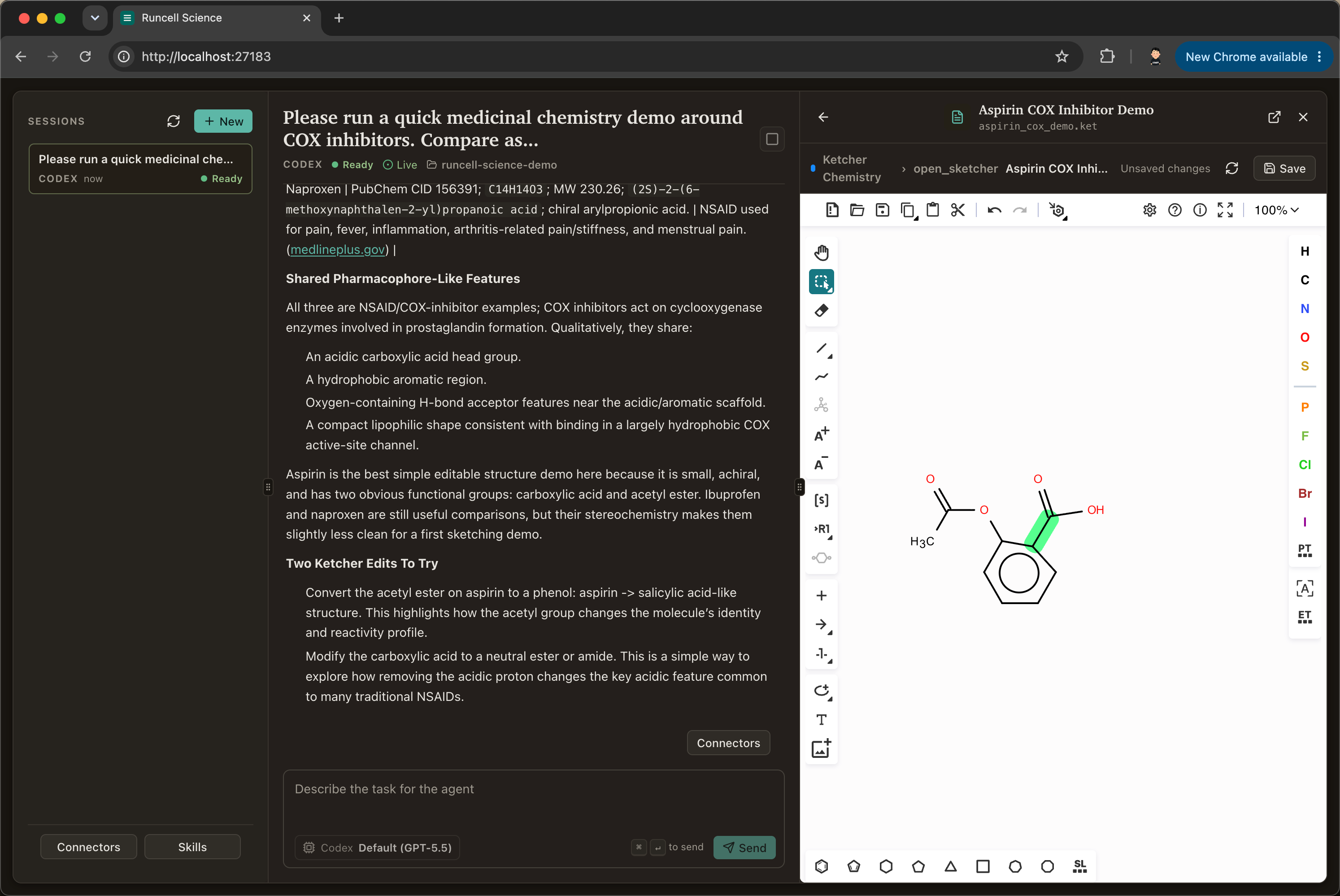
Read papers. Keep the methods.
Compare approaches, extract protocols, and turn literature into working notes for the next step of your research.
Run code. Inspect the evidence.
Work with scripts and notebooks, review generated figures, and keep the resulting files beside the session.
Bring your domain tools.
Use and extend skills for BioTech, chemistry, and data analysis. The library is growing, and the workflow is yours to adapt.
Two ways to work with Runcell
Choose the workspace that fits.
Open-source project
Runcell Science
For researchers and developers who want to inspect the source, adapt scientific skills, and shape their own local research workspace.
Apache-2.0 · Local setup · No Runcell account required
Set up Runcell ScienceFrom the Runcell team
Runcell Desktop
Prefer a downloadable app for your notebook workflow? Explore Runcell Desktop, our separate product for working with AI in Jupyter notebooks.
Desktop beta · See available builds on the download page
Explore Runcell Desktop§ 3 / Runcell Science
An open alternative to Claude Science.
Choose based on how you want to work: your agent runtime, your tools, and how much of the workspace you want to adapt.
| What matters | Runcell Science | Claude Science |
|---|---|---|
| Agent runtime | Claude Code or Codex | Claude |
| Source & customization | Apache-2.0 source. Modify the workspace and add your own skills. | Supports custom skills and connectors. |
| Getting access | Run the source locally with a configured agent CLI. Provider access and usage limits apply. | Available to Claude Pro, Max, Team, and Enterprise users. Admin enablement may be required. |
| Where you work | A local workspace for project files, sessions, and scientific artifacts. | macOS, Linux, or remote compute through SSH and HPC workflows. |
Swipe the table to compare both workspaces.
An independent project by the Runcell team, not affiliated with Anthropic. Claude Science details checked September 29, 2026 against Anthropic’s product announcement. Features and access may change.
§ 4 / Runcell Science
Start your first local session.
Clone the project, start the workspace, and bring a research question of your own.
git clone https://github.com/runcell-ai/runcell-science.git
cd runcell-science
./scripts/dev.shhttp://127.0.0.1:27183Prefer to start services manually?
yarn install
yarn dev§ A / Runcell Science
A few practical questions.
Is there an open-source alternative to Claude Science?
Yes. Runcell Science is an open-source alternative to Claude Science for research automation. It helps with papers, experiments, code, and science workflows while running locally on your machine under the Apache-2.0 license.
Does Runcell Science work with my existing Claude Code subscription?
Runcell Science uses the Claude Code or Codex CLI installed on your machine. Sign in through the CLI with an account that has access to it. Your provider’s plan, usage limits, and billing settings still apply.
Do I need my own API keys?
For the Claude Code or Codex setup shown here, use your signed-in CLI; there is no additional Runcell API key to configure. Authentication and any model charges depend on how you have configured that CLI.
How is this different from building an agent with its own harness?
Runcell Science focuses on the science workflow layer: research sessions, artifacts, and domain skills for papers, experiments, code, BioTech, and chemistry. It uses Claude Code and Codex for the underlying agent runtime so more effort can go into scientific workflows.
Is Windows supported?
For the local web workflow on Windows, use WSL and set up the project and your chosen agent CLI there. Desktop packaging is evolving; check the GitHub repository for current build availability and platform requirements.
How does Runcell Science relate to Runcell?
Runcell Science is an open-source project by the Runcell team. Runcell itself is a separate commercial product — an AI agent for Jupyter notebooks. Runcell Science is independent and Apache-2.0 licensed; you do not need a Runcell account to use it.
Your next research session
Read the code. Run the science.